Video Reporter
> wdio-video-reporter is a 3rd party package, for more information please see GitHub | npm

This is a reporter for Webdriver IO v6 that generates videos of your wdio test executions. If you use allure, then the test cases automatically get decorated with the videos as well. (For Webdriver IO v5, please use wdio-video-reporter version ^2.0.0.)
Videos ends up in wdio.config.outputDir
Checkout example Allure report with included videos on failed tests here: https:
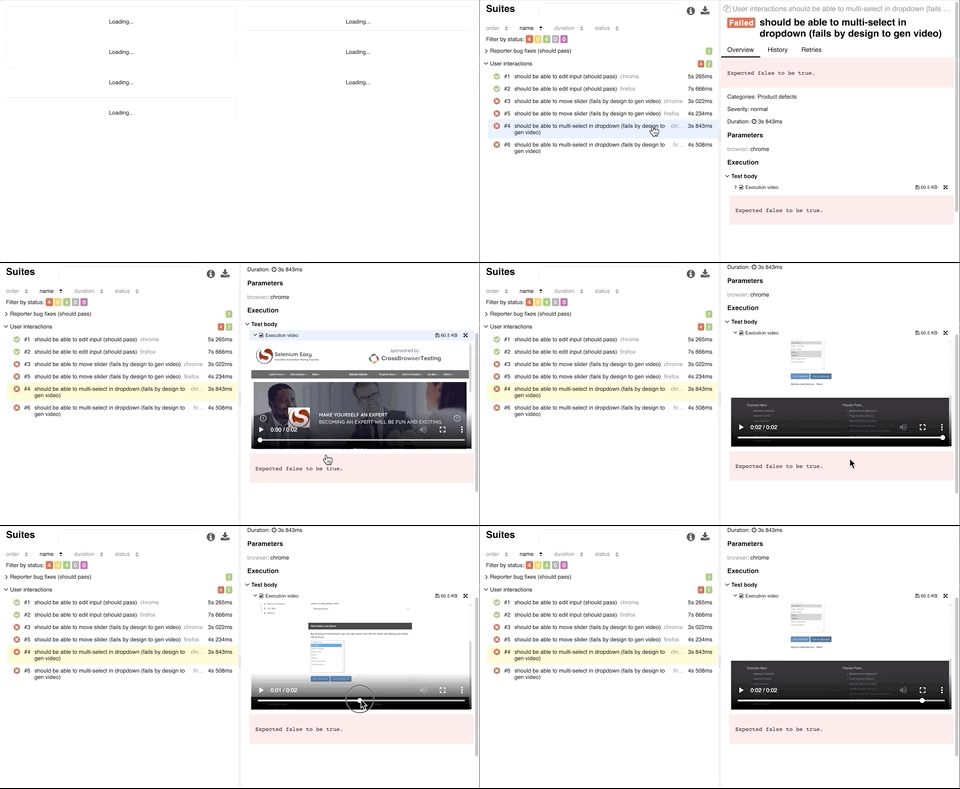
Pros:
- Nice videos in your allure reports
- Nice human speed videos, even though tests are fast
- Works with Selenium grid
- Works with all webdrivers that support ``
- Verified on the following Deskop browsers using Selenium 3.141.59:
- Chrome
- Firefox
- Safari
- Internet Explorer 11
- Microsoft Edge
- Verified on the following ios and android devices with Appium 1.13.0-beta3:
- Iphone 8
- Ipad Gen 6
- Samsung galaxy S9
- Samsung galaxy tab A10
Cons:
- Works by taking screenshots after "actions", which makes the tests a little bit slower. This is mitigated by carefully choosing which jsonWireProtocol messages that should result in a screenshot
- Selenium drivers doesn't include alert-boxes and popups in screenshots, so they are not visible in the videos
Quick start
Checkout the simple template at wdio-template to quickly get up to speed.
Clone one of the repositories and install dependencies with or. Then run or in demo directory and finally or to see allure report.
Installation
Install the reporter
or
Add the reporter to config
At the top of the ``-file, require the library:
Then add the video reporter to the configuration in the reporters property:
Using with Allure
Adding the Allure reporter as well, automatically updates the reports with videos without any need to configure anything :-)
Configuration
Normal configuration parameters
Most users may want to set these
Set to true to save videos for passing tests.Integer between [1-100]. Increase if videos are playing to quick.Max seconds to wait for a video to render.If its not set, it uses wdio.config.outputDir.
Advanced configuration parameters
Advanced users who want to change when the engine makes a screengrab can edit these. These arrays may be populated with the last word of a jsonWireProtocol message, i.e. /session/:sessionId/``.
Add actions where screenshots are unnecessary.Add actions where screenshots are missing.
To see processed messages, set and check. This will also leave the screenshots output directory intact for review
To avoid extra logging all together and only get the video files, set ``.
Cucumber support
If you are using the Allure reporter, you need to ensure you do the following:
- Use `` instead of using the built-in node assertions otherwise the failed tests gets reported as broken in your steps definitions
- Add
to Allure option infile, a typical configuration would look like this:
For a complete example, checkout the cucumber branch at the wdio-template
Appium setup
Since v1.2.4 there is support to help Allure differentiate between safari and chrome browsers on desktop and devices.
The reporter uses the custom property to id the different devices.
Recommended values are and.
It is recommended to include `` as well for all browsers to avoid a bug in Chrome webdriver when using devices in same Selenium grid as desktop Chrome browsers.
The generated video files will also get `` added to the browser name.
Example appium configuration:
And ``:
Contributing
Fork, make changes, write some tests, lint, run tests, build, and verify in the demo that changes work as they should, then make a PR.
The demo folder works with the built version of the library, so make sure to build if you added new features and want to try them out.
Thanks
Thanks to Johnson E for fixing Cucumber support which alot of users have asked for.